toro4n – draw Neo4j graph data models in the browser
toro4n is an online tool for drawing graph data models for Neo4j and other property graph databases: nodes, relationships, labels, and properties, with layers, notes, and automatic layout. There's nothing to install, and no account is needed.
Open toro4n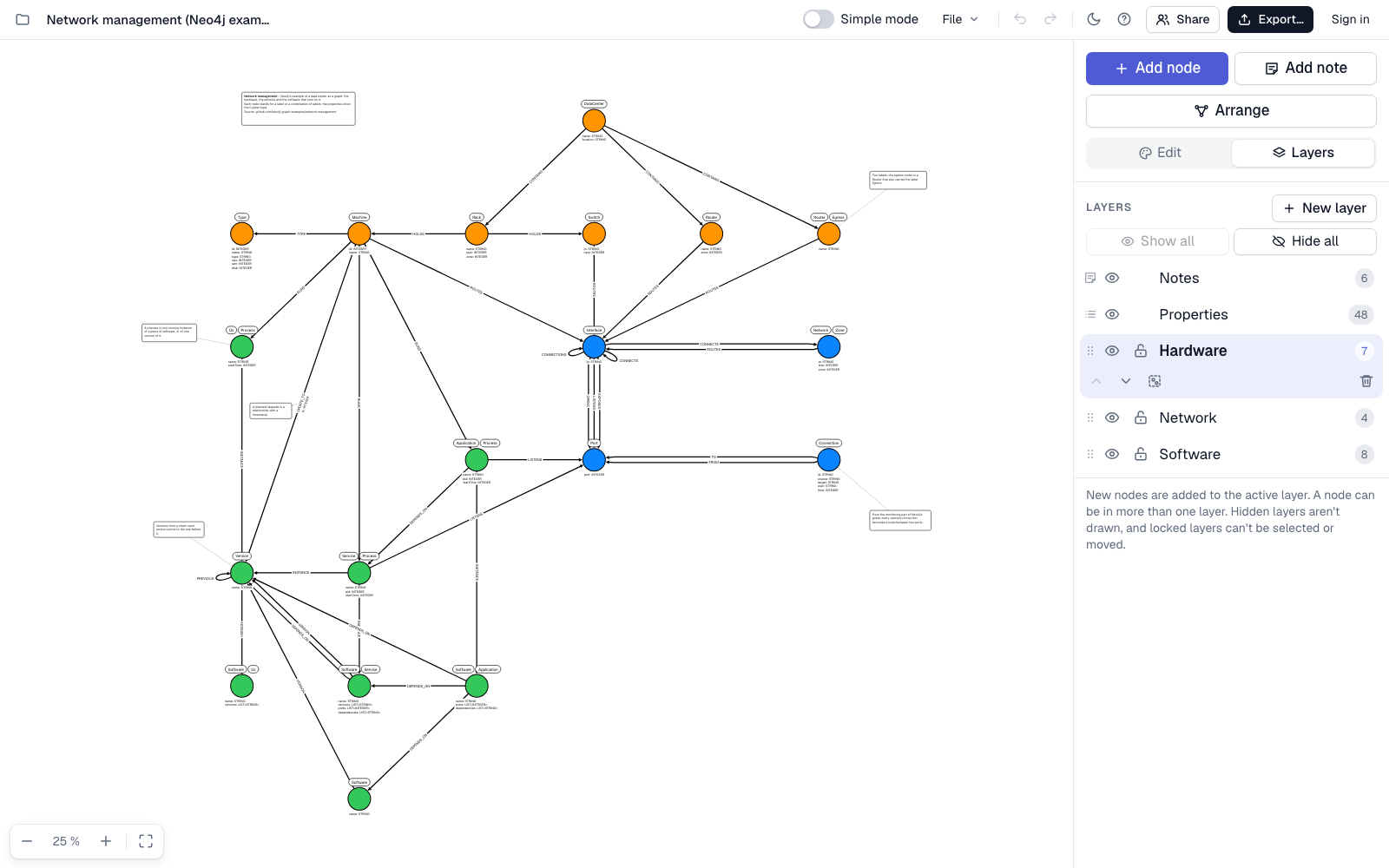
What you can do
- Draw your model. Add nodes, drag relationships between them, and give them labels, relationship types, and properties. Each property has a key, a type from Neo4j's list of property types, and an example value, and can be marked unique or required. Paste a list, a spreadsheet table, JSON, or a CREATE TABLE statement to add many properties at once.
- Work in layers. Put nodes in layers, like in an image editor, and show, hide, lock, and reorder them. A node can be in several layers at once. A single switch shows or hides all property text.
- Add notes. Write notes with bold and italic text and attach them to one or more nodes and relationships. They move with them when the graph is rearranged.
- Keep it simple. Simple mode shows only node captions and relationship types, for a demo or a first sketch. Everything else is hidden, not deleted.
- Arrange in one click. toro4n positions the nodes in a compact layout where as few relationships as possible cross.
-
Export. Cypher
CREATEstatements for Neo4j, JSON, SVG, and PNG, with the option to include only visible layers. - Import and merge. Open a model by pasting its JSON, choosing a file, or dragging a file into the window, or add an imported model to the one that's open. Paste a list of names, one per line or cells copied from a spreadsheet, and each name becomes a node with that label. Each import gets its own layer, which you name. When nodes have the same labels, toro4n asks whether to merge them into one node or leave them as they are, and where they differ, you choose what to keep. Capitalization always follows the Neo4j convention: labels like Person, relationship types like ACTED_IN, and property keys like name.
- Draw an existing Neo4j database. Run two queries in Neo4j Browser and paste the results into Import. toro4n draws the database's structure: one node per label combination, the properties and their types, the relationships between them, and the unique and required constraints. toro4n reads only the structure, never the data, and never connects to the database, so it works with any Neo4j installation.
- Style it. Draw nodes as circles, or turn on Square mode for cards with the labels in a colored band and the properties listed inside. Set colors, sizes, border widths, and text sizes for a single node or relationship or for the whole model, in a light or dark theme. By default, nodes size themselves so their caption fits on two lines inside. One button resets the whole model to the default style, which is handy after an import.
- Work together. Sign in with a code sent to your email, save a model online, and share it with specific people, giving each one permission to edit or only to view. Everyone who has the model open sees the others' changes, selections, and pointers in real time, and undo only reverts your own changes. Earlier versions are saved automatically, and you can view and restore any of them. Your own folders keep your online models organized by project. Online models are stored within the EU, and only the people you share them with can open them.
- Let an AI assistant draw it. Connect Claude, ChatGPT, or another AI assistant to toro4n and ask it to sketch a graph model from whatever you give it: a description, a document, a spreadsheet, or a database schema. It draws the model in your account, laid out and ready to edit, and can edit your models while you watch. How to connect.
- Keep your models private. Without signing in, models are saved automatically in your browser, you can save them as JSON files, and nothing is sent to a server. Signing in is optional, and when you do, only the models you choose to save online leave your browser. The app never contacts any other address.
Use toro4n from an AI assistant
toro4n works with AI assistants that support the Model Context Protocol, the open standard for connecting assistants to other services. Once connected, an assistant can draw new models in your toro4n account and read and edit your online models, and you see every change as it happens. You need a toro4n account: the assistant only works with models you've saved online, never with the models stored in your browser.
Connect your assistant to this address:
https://toro4n.com/mcp- Claude (claude.ai and the desktop and mobile apps): go to Settings > Connectors > Add custom connector. Paste the address, add the connector, and choose Connect. Then turn it on in a chat with the + button.
- ChatGPT: in Settings, under Apps, turn on developer mode (custom connectors depend on your plan), then create an app with the address and choose OAuth for sign-in.
-
Claude Code, Gemini CLI, VS Code with Copilot, Cursor, and other tools:
add a remote MCP server over HTTP with the address, for example
claude mcp add --transport http toro4n https://toro4n.com/mcporgemini mcp add --transport http toro4n https://toro4n.com/mcp.
The first time, the assistant sends you to toro4n to sign in and choose Allow. Then ask it something like “Sketch a graph model of our order system from this document” or “Add invoices to my web shop model.” It replies with a link that opens the model.
The assistant can view, create, and edit your online models and the models shared with you, with the same permissions you have. It can't delete or share models. Before every change, the previous version of the model is saved in Version history, so you can undo any change. What the assistant reads is handled by the company that provides it, under its own terms. To view or disconnect your assistants, go to Account in toro4n.
Try it with an example
Open Neo4j's network management example as a graph model: a data center with its hardware, network, and software, in 19 nodes and 38 relationships of 17 types, with Cypher types on the properties, three layers, and attached notes. The examples pages describe this model and Neo4j's Northwind example in full, with the Cypher each one exports.
Learn more
The user guide has a page for each part of toro4n: nodes and relationships, properties, layers, notes, export, import, drawing an existing Neo4j database, automatic layout, working together, AI assistants, formatting, and keyboard shortcuts.
Frequently asked questions
What is toro4n?
toro4n is an online tool for drawing graph data models: nodes, relationships, labels, and properties. It's built for Neo4j and other property graph databases, and it runs in your browser at toro4n.com.
Does toro4n export Cypher for Neo4j?
Yes. You can export a model as Cypher CREATE statements for Neo4j, with a constraint for every property marked unique or required. You can also export to JSON, SVG, and PNG, and limit the export to visible layers.
Do I need an account or to install anything?
No. toro4n opens right in your browser. Models are saved automatically in your browser, and you can also save them as JSON files. An account is optional: to save models online and work on them with others, sign in with a code sent to your email. There's no password.
Can multiple people work on the same model?
Yes. Sign in, save the model online, and share it by email address, giving each person permission to edit or only to view. Everyone who has the model open sees the others' changes, selections, and pointers in real time. Earlier versions are saved automatically, and you can restore any of them. Online models are stored within the EU, and only the people they're shared with can open them. To open a shared model, a person signs in with the email address that was invited; there's no link that lets anyone else in.
Can toro4n draw a model of an existing Neo4j database?
Yes. In Import, choose Neo4j database, run the two queries shown there in Neo4j Browser, and paste the results back. toro4n draws one node per label combination, with its properties and their Neo4j types, the relationships between them, and the unique and required constraints. It reads only the database's structure, never its data, and never connects to the database.
Can an AI assistant draw a model in toro4n?
Yes. toro4n works with Claude, ChatGPT, and other AI assistants that support the Model Context Protocol. Add https://toro4n.com/mcp to your assistant as a connector, then sign in to toro4n and allow access. Ask the assistant to sketch a graph model from a description, a document, or a database schema: it draws the model in your toro4n account, lays it out, and gives you a link. It can also read and edit your online models, and you see the changes as they happen. You can undo any change in Version history.
Where are my models stored, and does anything leave my computer?
Without signing in, models are stored only in your browser, on your computer, and in any JSON files you choose to save. Nothing is sent to a server, and the browser is instructed to block requests to any other address, so this holds even for a model file that someone has tampered with. If you sign in, only the models you choose to save online are stored on toro4n's own server, within the EU, where only you and the people you share them with can open them. Your other models stay in your browser. For details, see the Security tab in the app's help (the ? button) and the page on how your data is handled.